> ## Documentation Index
> Fetch the complete documentation index at: https://nextgen-docs.enfuce.com/llms.txt
> Use this file to discover all available pages before exploring further.

# Overview

3D Secure (3DS) is an authentication protocol that ensures secure online card payments. This enhances your cardholders' confidence, as it supports additional verification of cardholder's identity through multiple methods.

<Info>
  <ul>
    <li>3DS is mandatory for European Economic Area (EEA) and the United Kingdom (UK) to comply with Payment Services Directive (PSD2) and Strong Customer Authentication (SCA).</li>
    <li>The BIN range must be enrolled in the card Scheme's 3DS service. As you are an Enfuce customer, during project initiation, we would enrol your BIN and card programs in the Scheme specific 3DS service. </li>
  </ul>
</Info>

## Authentication Methods

To conform with 3DS, Enfuce supports multiple authentication methods. You can select **one/multiple method(s)** appropriate for your business and card programs.

<div style={{ marginLeft: '10px', marginTop: '20px' }}>
  <AccordionGroup>
    <Accordion title="Out-of-Band (OOB) Authentication: In-app">
      <div style={{ marginLeft: '20px' }}>
        In this method, a notification is sent to the cardholder via your application (web/mobile); if the request is genuine, the cardholder must approve the authentication request.

        To know how you can support the OOB authentication method via Enfuce, see the [3DS Authentication API](/guides/transaction-lifecycle/cardholder-authentication/3DS/3DS-authentication-api).
      </div>
    </Accordion>

    <Accordion title="SMS One Time Password (OTP)">
      <div style={{ marginLeft: '20px' }}>
        The cardholder receives a OTP sent to their phone number. We send the OTP to the number recorded in the `mobileNumber` parameter of the [<strong>Create Cardholder Endpoint</strong>](https://nextgen-docs.enfuce.com/api/cardholders/create-cardholder#body-mobile-number).

        <Note>
          <ul>
            <li>If there is any change in the contact number, modify the `mobileNumber` parameter in the [<strong>Update Cardholder Endpoint</strong>](https://nextgen-docs.enfuce.com/api/cardholders/update-cardholder).</li>

            <li>If you have selected this authentication method and the cardholder does not have a mobile number configured, they would receive an error to register their contact number.</li>

            <li>If Enfuce is your BIN Sponsor, you must combine SMS OTP with another authentication method, such as Static Password, to ensure PSD2 compliance.</li>
          </ul>
        </Note>
      </div>
    </Accordion>

    <Accordion title="Static Password">
      <div style={{ marginLeft: '20px' }}>
        The cardholder is authenticated via the card's static password. If the password is not set, the cardholder receives an error and is redirected to the merchant's website.
      </div>
    </Accordion>
  </AccordionGroup>

  <Info>
    <ul>
      <li>You can select different authentication methods for different card types.</li>
      <li>OOB is the most commonly used authentication method.</li>
      <li>You can configure a **fallback** authentication method, such as, if the OOB option fails, the cardholder would be authenticated with the SMS OTP and static password. To set up a fallback method, contact your customer support representative.</li>
    </ul>
  </Info>
</div>

## 3DS Authentication Workflow

In the 3DS authentication workflow, multiple participants are involved. The following process provides a simplified representation of the process:

1. The merchant initiates the 3DS process.

<Note>
  <strong>Risk-Based Authentication</strong>: If the transaction risk is low and no regulation is violated, the merchant might want to bypass the 3DS authentication workflow. Enfuce would analyse the risk and check applicable regulations (PSD2 regulation and card Scheme rules) to determine whether 3DS authentication is required. If 3DS authentication is not required, the merchant can proceed to authorisation.
</Note>

2. If authentication is required, the merchant continues with the 3DS authentication workflow.

3. Based on the authentication method you have selected, Enfuce redirects the cardholder to an appropriate landing page:

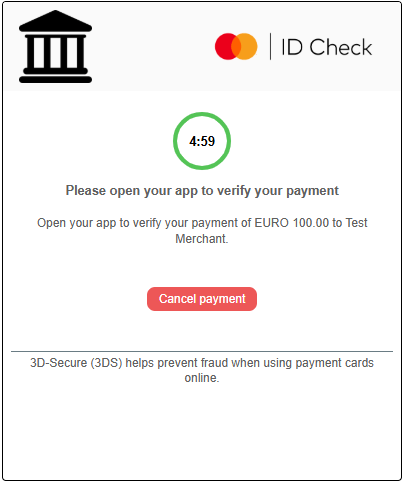
   * **OOB authentication**: The cardholder receives a notification on your application, where we send the authentication request; if the request is genuine, the cardholder must approve the notification. If approved, the cardholder is successfully authenticated.
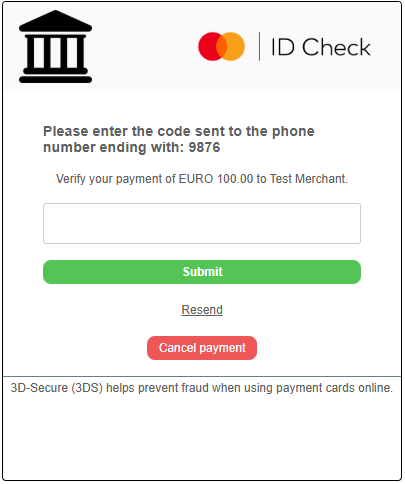
   * **SMS OTP**: We send a OTP to the cardholder's phone number. The cardholder must enter the same OTP for successful authentication.
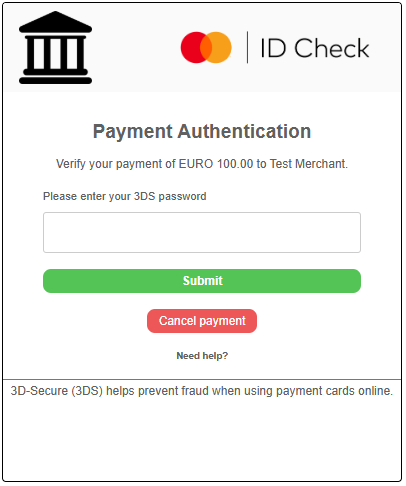
   * **Static Password**: The cardholder must enter the card's static password. If the password is correct, the cardholder is successfully authenticated.

   <Note>If you have selected a combined method of static password + SMS OTP, the cardholder must enter the card's static password on the landing page and then enter the OTP they have received.</Note>

4. The cardholder is authenticated.

5. Enfuce forwards the response to the merchant.

6. Based on the authentication result, the merchant performs any of the following:

   * If authentication is successful, the merchant includes this information in the next step of transaction processing — Authorisation.
   * If authentication is unsuccessful, the merchants either declines the transaction or requests for an alternative payment method.

## Enfuce's Role in 3DS Service

We operate as a payment processor and facilitator in the 3DS flow. We conform with all regulations of card Schemes; and hence, when we receive 3DS authentication requests, we verify the cardholder's authenticity and send appropriate responses to merchants. We perform the following responsibilities:

* **Enrolment**: Enrol all cards to the card Scheme's 3DS programs.

* **Evaluate necessity of 3DS authentication**: If a merchant wants to bypass the 3DS authentication workflow, Enfuce would analyse the risk and check applicable regulations to determine whether 3DS authentication is required.

* **Risk rules and risk profiles creation**: We create risk rules and profiles — risk profiles determine the risk level of a transaction and decides whether a transaction would be exempted from 3DS authentication workflow.

* **3DS authentication**:

  * **OOB authentication**: We send the authentication request to your application that the cardholder must approve/decline.
  * **SMS OTP**: We send the SMS OTP to the cardholer's phone number.
  * **Static Password**: We successfully authenticate the cardholder if the card's static password is correct.

* **UI customisations**: We develop the User Interface (UI) displayed to the cardholders. For any customisation, speak with our customer support team.

  * SMS OTP: We build the SMS template.
  * Landing page: We build the landing page displayed to cardholders during authentication. Here are a few samples of the landing pages for each authentication method:

  <AccordionGroup>
    <Accordion title="OOB Authentication">
      <div style={{ textAlign: "center" }}>
        <img src="https://mintcdn.com/preview-docs/2Ueu8Wiqtu_soOb7/images/Basic-OOB-screen-with-Timer.png?fit=max&auto=format&n=2Ueu8Wiqtu_soOb7&q=85&s=09ad03e31809b630a3d3b562eda285e9" alt="OOB Screen Timer" width="300" data-path="images/Basic-OOB-screen-with-Timer.png" />
      </div>
    </Accordion>

    <Accordion title="SMS OTP">
      <div style={{ textAlign: "center" }}>
        <img src="https://mintcdn.com/preview-docs/2Ueu8Wiqtu_soOb7/images/Basic-SMS-OTP-Screen.png?fit=max&auto=format&n=2Ueu8Wiqtu_soOb7&q=85&s=f42c6dddd60e20cfb4bb9fcc1627f4b5" alt="SMS OTP Screen" width="300" data-path="images/Basic-SMS-OTP-Screen.png" />
      </div>
    </Accordion>

    <Accordion title="Static Password">
      <div style={{ textAlign: "center" }}>
        <img src="https://mintcdn.com/preview-docs/2Ueu8Wiqtu_soOb7/images/Basic-Static-Password-screen.png?fit=max&auto=format&n=2Ueu8Wiqtu_soOb7&q=85&s=3558ef1636f31fb9569758ae974955e4" alt="Static Password Screen" width="300" data-path="images/Basic-Static-Password-screen.png" />
      </div>
    </Accordion>
  </AccordionGroup>

* **Whitelisting merchants**: We can whitelist specific merchants; authentication requests from these merchants are exempted from 3DS authentication workflow.