

- This feature is PCI-DSS compliant; hence, there is no risk of exposing sensitive confidential information.
- A cardholder can view PIN only for cards with an
INITIALorACTIVEcard version status.
Viewing PIN | Workflow
- A cardholder completes Strong Customer Authentication (SCA) and initiates a request in the mobile/web application to view PIN.
- Your system sends an API request to Enfuce to generate a unique temporary ID and two URLs – one for the mobile view and the other one is for the web view.
Related Endpoint: Request PIN Control Access Token
- In this request, you can specify the
sequenceNumber. If no value is specified, the latest card version is used. - We do not perform additional validation, except the
cardId. Hence, if thecardIdis invalid, the request fails. If you want to check whether the card is eligible for payments, you must send additional API requests to verify the card status and its balance.
- In the endpoint response, a unique ID and two URLs are returned —
pinURLis for viewing the PIN on mobile devices andpinFrameURLis for viewing the PIN on web.
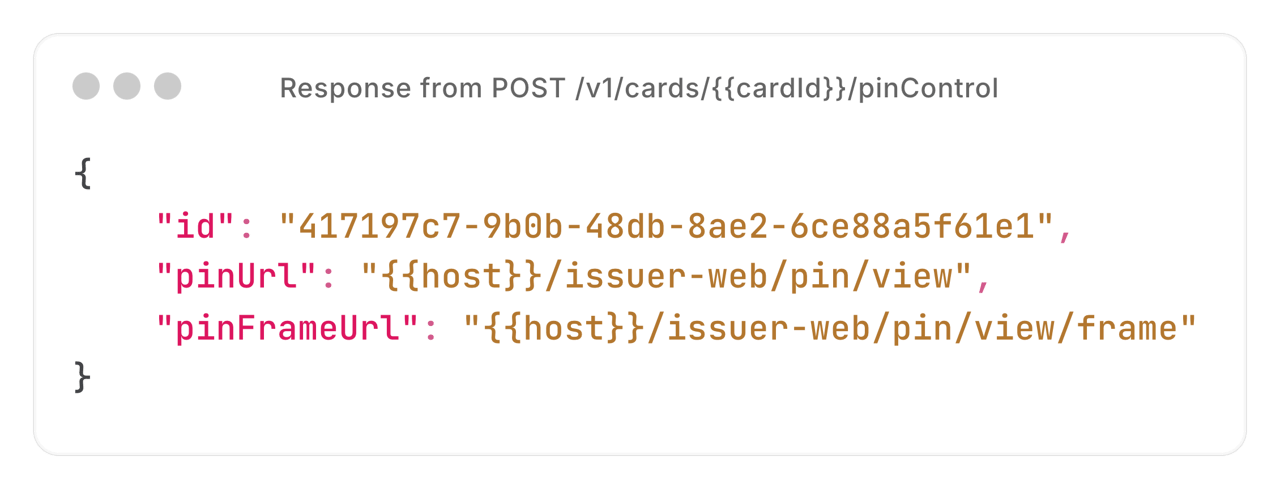
- The cardholder accesses either the
pinURLor thepinFrameURL, based on where they are viewing the PIN.
The ID is valid for 30 seconds. The cardholder must access the appropriate URL within these 30 seconds to retrieve the HTML snapshot.
- Another API request is sent to retrieve the card data in an HTML snapshot:
- Mobile applications: Mobile application retrieves the HTML snapshot by any of the following ways:
- Web applications: The browser opens iframe to
pinUrl. Then the parent page sends a window.postMessage() to the iframe. The posted message object includesoperation: view-pinandidfield.
GET Request to pinURL
GET Request to pinURL
A GET request is sent to the
pinURL, including the previously returned id in a query parameter titled pinControlId.POST Request to pinURL
POST Request to pinURL
A ‘POST’ request is sent to the
pinURL, including the previously returned id in a parameter titled pinControlId. The request can be sent in any of the following ways:Form Field
Form Field
Query Parameter
Query Parameter
JSON Payload
JSON Payload
The API request fails if the
id is incorrect.-
An HTML snapshot is returned with the PIN included. The HTML includes a Javascript that manages the retrieval and encryption of PIN:
- A public key is generated on the device.
- The public key is sent to Enfuce.
- The PIN is encrypted with the public key and returned to the device.
- Javascript decrypts the PIN and includes it in the HTML snapshot.
To display the HTML snapshot containing the card PIN correctly in Postman, add an after-response script to the request that retrieves the HTML snapshot:
- Open the request in Postman and select Scripts > After response.
-
Paste the following script into the script editor:
- Click Send, then click Visualization in the response pane to display the HTML snapshot.
Page Callbacks
You can implement callback both for the mobile and the web applications:Callbacks for Mobile Devices
- Android Devices: The javascript interface name is
android_handler.
Here is a sample callback:
- iOS Devices: The message handler name is
ios_handler. The posted message body includes the event parameter containing the callback name and might also contain the pin_valid-field.
Here is a sample callback:
On successful retrieval of PIN, the
view_pin_success message is sent. If the operation failed, the view_pin_error message is sent.